ElectroNG is now free and open source! Today we are releasing both the desktop application and its core analysis engine under the Apache License 2.0, opening up years of Doyensec’s work on Electron application security to the community.
Why we are open-sourcing ElectroNG
We launched ElectroNG in September 2022 as a commercial static application security testing (SAST) tool for Electron applications. It grew out of our experience auditing Electron apps and developing Electronegativity, with the goal of turning that research into a more capable scanner and an easier workflow for developers and security researchers.
We are proud of what we built. However, despite our best efforts, we could not build a customer base large enough to sustain its development, and we stopped selling licenses in June 2025. Rather than letting the project fade away, we decided to release the source code and give ElectroNG a future shaped by the people who use it: developers securing their applications, researchers building new checks, and teams incorporating Electron security into their work.
This is a significant milestone for Doyensec. From our Electron security research at Black Hat USA 2017 to the release of Electronegativity in 2019 and ElectroNG in 2022, we have invested years in understanding how Electron applications break and how to help secure them. We are excited to make the next stage of that work an open-source effort.
The code is available in two repositories:
- ElectroNG: the desktop application (user interface, project management, and reporting).
- ElectroNG-core: the scanning engine, including all the security checks, the knowledge base, and the Electron vulnerability database.
Both are free to use for any purpose, including commercial work. There are no license keys and no usage limits.
What ElectroNG adds to Electronegativity
Electronegativity started as a command-line tool to help developers and auditors identify insecure configurations and security anti-patterns in Electron applications. ElectroNG builds on that foundation with improved analysis and a desktop interface for investigating the results.
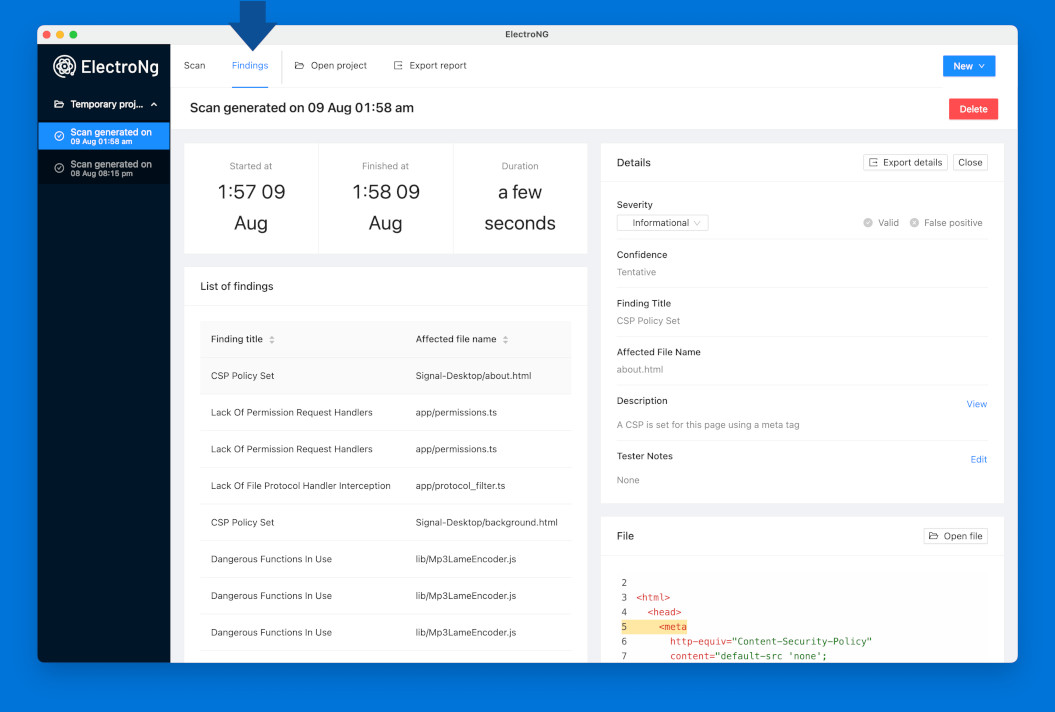
The main differences are:
| Area | Electronegativity | ElectroNG |
|---|---|---|
| Workflow | Command-line scanning, programmatic use, and CI integration | A desktop application for managing projects, configuring scans, and investigating findings |
| Detection | AST and DOM analysis of Electron configurations and security anti-patterns | Improved HTML, JavaScript, and TypeScript parsing, revised heuristics, and around 60 checks |
| Electron versions | Version detection, version overrides, and upgrade checks | Version-aware checks, plus a database of more than 650 known Electron vulnerabilities |
| Application inspection | Findings surfaced through command-line output and reports | An inventory of BrowserWindow and BrowserView security settings |
| Reviewing findings | Severity and confidence filters, with CSV and SARIF output | In-app triage to validate findings, mark false positives, adjust severity, and add notes, with PDF, HTML, XLSX, CSV, and SARIF reports |
Try out ElectroNG
The easiest way to try ElectroNG is to download the latest build for macOS or Windows from the Releases page. Create a project, import the target, and start a scan; the default configuration works without any setup. The ElectroNG website hosts the quickstart guide, documentation, and FAQ.
Automatic updates are disabled by default: ElectroNG does not check for or download updates unless you opt in from the application menu.
If you prefer to build from source, or want to hack on the tool, the ElectroNG README explains how to build the core engine and run the desktop application locally. ElectroNG-core can also be used on its own as a library, although its API is primarily designed around the needs of the desktop app.
The future and how to contribute
We want to be clear about the project’s starting point:
ElectroNG’s last substantial development work took place in 2024, followed by smaller bug fixes. Its detection capabilities need updating for modern Electron applications, and results on recent versions can be incomplete or noisy.
Opening the source gives us an opportunity to address that gap together. Our goal is to modernize the tool, improve its detection capabilities, and make ElectroNG a go-to security scanner for Electron applications again.
Electronegativity is now archived, and we encourage its users and contributors to help move ElectroNG forward.
There are several areas where contributions would make a meaningful difference:
- Update Electron coverage. Bring checks in line with current APIs, security defaults, and application patterns.
- Improve detection. Add checks for new vulnerability classes, reduce false positives, and improve how the scanner handles JavaScript and TypeScript code found in real applications.
- Modernize the codebase. Help update dependencies, parsing, and the build process so the project is easier to run and maintain.
- Add regression tests. Small examples of vulnerable and secure code can help demonstrate a missed issue, reproduce a false positive, and keep future changes from reintroducing bugs.
- Improve the experience. Better CI/CD setup instructions, check documentation, reporting, and interface improvements all make the tool more useful.
New checks and changes to the scanning logic belong in ElectroNG-core, while changes to the desktop interface belong in ElectroNG. We welcome issues, pull requests, and ideas in both repositories.
Thank you to everyone who contributed to Electronegativity, helped build ElectroNG, supported the commercial product, or shared research that made these tools better. We are proud to put this work in the community’s hands, and we look forward to seeing what we can build together.